
SMS Integration
Enabling SMS will allow you to send text messages via the Brokeredge system.
You can send texts to contacts via the automated client journey's and also directly on the contact page. Replies from contacts are added to the contact text message tab and you will receive an email notification of the reply by default.
Step 1 is to go to 'My Settings' and scroll down to toggle on 'Show Third Party Integrations'
You can text your contacts in one of 3 ways:
1. From Brokeredge's generic SMS number - this is the simplest to set up. Since messages come from a generic number, you should include your contact details in the text message so your contact knows who is sending the message.
2. From your own Twilio account - Twilio allows you to set up your 'from' details, so contacts will receive a more personalized experience. Twilio accounts are about $2.15 USD per month and text messages are less than $0.01 per message. If you have your own Twilio account, you can also send mass texts and enable text forwarding to your own phone number.
3. From your own RingCentral account - RingCentral is a Voip system that can be used as an alternative to a business phone number. Plans are about $40/month but this includes a large number of features like a phone and sms as well as meeting hosting. With RingCentral, you can also send texts directly from their app, just like a regular text message from your phone.
4. From your own Dialpad account - Dialpad is a Voip system that can be used as an alternative to a business phone number. Plans are about $40/month but this includes a large number of features like a phone and sms as well as some other AI features. With Dialpad, you can also send texts directly from their app, just like a regular text message from your phone.
- From your own Quo Account - With the Quo integration, you will be able to send text messaged from Brokeredge, view your message history with a contact, automatically push new Brokeredge contacts to Quo, and automatically create call record summaries from Quo on the contact page if summaries are enabled in Quo.
Additional features if you have your own subscription:
1. A new section called Text Messaging will be available. On this page, you can see Conversations you have with contacts and the ability to send mass text messages.
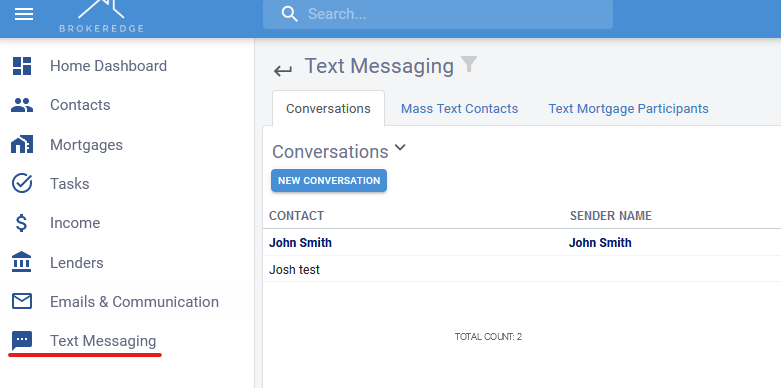
2. Conversations will be bolded when the most recent message is from a contact. To unbold, click into the conversation.