
How to Connect to Finmo
Finmo
API
1. Login to Finmo and go to “Team Settings”

2. Then go to “Integrations” then “Finmo API”

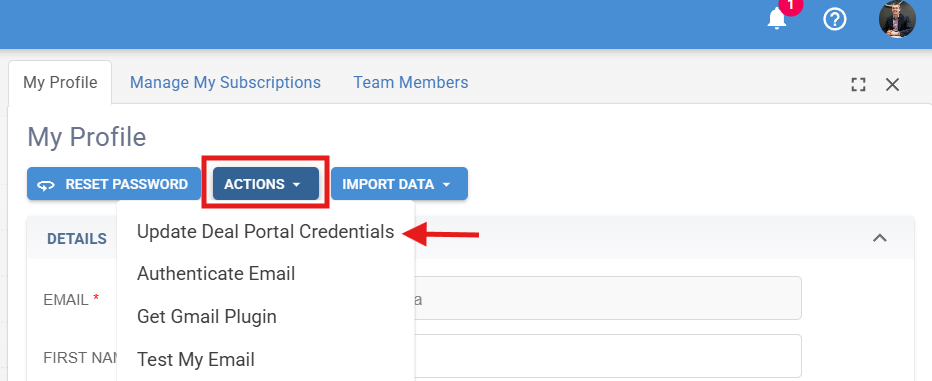
3. Hit the Generate new token, copy the token and then paste it in the API section on the Deal Portal Credentials in Brokeredge. To do so, log into Brokeredge, go to Profile > Actions > Update Deal Portal Credentials and find the pending connection or create a new one.
Resthooks
In order to get real time data from Finmo, please set up these 8 resthooks on your Finmo portal. To do so, follow these steps:
1. Login to Finmo and go to “Team Settings”
2. Then go to “Integrations” then “Resthooks”

3. Scroll down and hit the “Create a new resthook” button

4. You will create 7 resthooks:
a) For the first, choose Finmo event “Borrower email changed” and paste the following in the url and hit “Save”:
(url provided as apart of the onboarding prompted steps. Contact support@brokeredge.ca if you cannot locate them)

b) The next one, choose Finmo event “Deal note created” and paste the following in the url and hit “Save” (url provided in your onboarding prompted steps)
c) The last 5 will all use the same url. Following the same steps, create the following 5 resthooks with the url here in step b: (url provided in your onboarding prompted steps)
- Response received by lender
- Deal submitted
- Application submitted by borrower
- Application update event
- Deal status change
Note: If the API key is already set up on Brokeredge, then you can test the connection. To test that the resthooks are set up, click on any deal of yours in Finmo, then click Application, then hit the Update external system button. Once your API Key is set up, Brokeredge will initiate a pull overnight to pull in all of your old deal history