
How to Import Existing Mortgage Data from Filogix
If you have not yet imported existing mortgage data, you can do so by downloading your existing data from Filogix and upload it via your profile.
To get your mortgage data:
- Log into Filogix directly and go to Tools - Export to CRM
- Select the Level and set as One, Agent
-
Select the "Application Entry Date" and set fo the past 8 years

- Select All Records and Extract as CSV with the Consolidated option
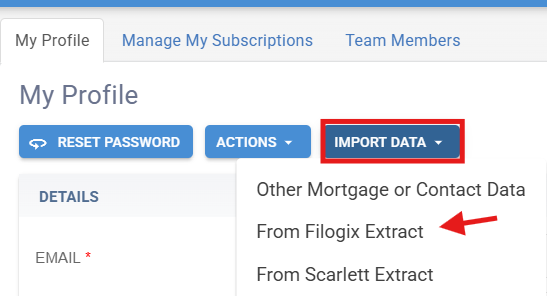
- To upload to Brokeredge, go to your Profile, and click Import Data, then From Filogix Extract, follow the prompts and use the up/down arrow to import.. The file will be imported overnight.

Please note:
- The file must be a CSV (it typically is)
- The date format in the file must match the upload settings (it usually does)
- Make sure only your files are included (check column GT in the file and make sure it's just your name)