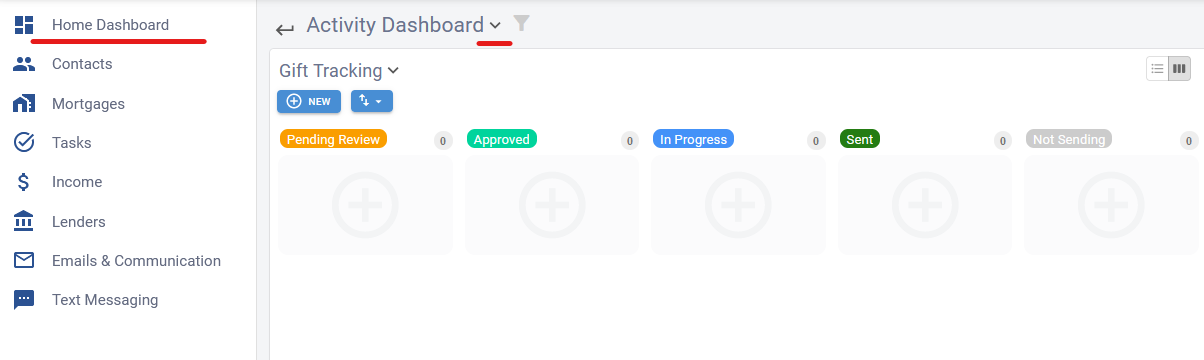
Gift Tracking
Brokerage CRM makes it easy to manage gifts for your contacts—whether you're giving them as a thank-you or using them as part of your mortgage journey.
Creating a Gift
-
Within a Contact's Activity Section:
On any contact page, scroll down to the Activity section and select the Gift tab. Here, you can see all gifts you've given or plan to give.

-
Ad-Hoc Creation:
Click the New button to create a gift record. Fill in the details, such as status, date, and any mortgage association if applicable.

-
Automated Gift Triggers:
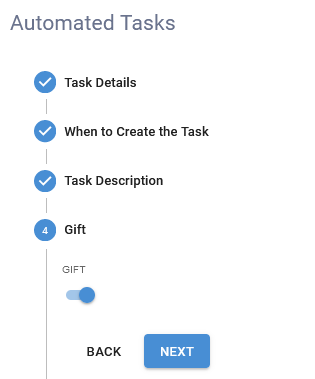
You can also integrate gifts into your mortgage journeys. For example, set a trigger on the Funded stage so that when a deal funds, a gift is automatically created for the applicant. Add tasks, checklists, and gift details to customize the process.
Tracking Gift Statuses
-
Dashboard View:
Navigate to your Home Dashboard and open the Activity Dashboard. At the top, you'll see a dedicated gift tracking section.

-
Managing Gifts:
Use this view to monitor and update the status of each gift, moving them between stages as needed.
This streamlined process helps you ensure that every gift is tracked and delivered on time, enhancing your relationship management and client experience.